

Organizing Your Data in OERCA
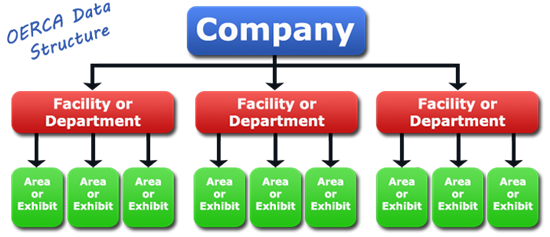
Deciding how you want to organize your information is an important part of the provisioning process. Creating virtual "Facilities/Departments" with associated "Areas/Exhibits" is a key part of this organization. Below are descriptions of what each represents followed by some real world examples.
Facility/Department
Each virtual Facility (or Department) created in OERCA is meant to represent a group of animals that are either housed or managed together. When new Users are created in OERCA, they will be assigned to a primary Facility, which is where they will "land" when they login. While in that facility, those Users will only see and have access to animals and information specific to that particular facility.
The image below shows one possible way a Company might organize its Facilities/Departments. For example, the "Aquarium" facility could represent all the fish species cared for by the Company; and the "Petting Zoo" could represent a separate physical location. As you can see below, each facility is specific to similar groups of animals or staff managing those animals. Each Facility can also be a separate geographical location for Companies that manage multiple stores, aquarium or parks.
NOTE: There are some modules in OERCA that will have company level access due to the fact they need to manage people and/or animals throughout the entire system. Examples of these modules are Company HQ (administration) and Health Management (veterinary).
NOTE: If a particular User (like a Curator) needs access to multiple Facilities, don't worry, we can open access to any part necessary in a later step.
IMPORTANT: Due to some critical configuration settings, Facilities can only be created by an OERCA representative. When you are first setting your Company, your OERCA rep will work closely with you to determine what facilities will be required to meet your operational needs. If you find you need to add additional Facilities to your Company, contact OERCA Support and they will gladly help you.
Area/Exhibit
Areas and Exhibits (e.g. tanks, habitats, etc.) further organize data within each Facility. These can be organized as physical spaces that house a group of animals, or even teams that manage a specific assignment of animals. Below shows and example of how this might look.
For information about adding and modifying Areas/Exhibits within a given Facility, read our article "Facility & Area/Exhibit Setup".
Comments
0 comments
Please sign in to leave a comment.