

Summary
OERCA's mobile web app was designed to simplify many types of record input. Below are detailed instructions showing how Animal Weights are entered into the system utilizing OERCA's mobile app.
To record animal weights via OERCA's mobile app, follow these steps:
-
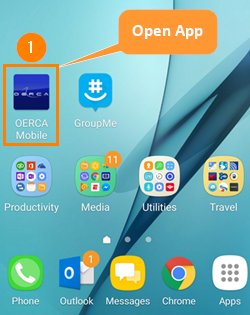
Open the OERCA mobile app on your phone or tablet by clicking a shortcut link to our Progressive Web App; or go to oerca.net on your mobile browser.
TIP: While most people are familiar with "native" apps that are downloaded to your mobile device; there are many notable benefits to using Progressive Web Apps (PWAs) when available. Due to these special benefits and current trends that often make PWAs preferred over native apps, The Animal Welfare App utilizes PWA technology.
-
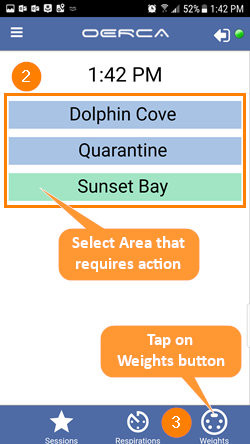
Tap on the area in which weights will be recorded. Once selected, the area button will turn green.
-
Tap on the Weights button located at the bottom of the screen (scale icon).
NOTE: The activity buttons at the bottom (Session, Respirations, Weights, etc.) will not show up until an area is selected.
-
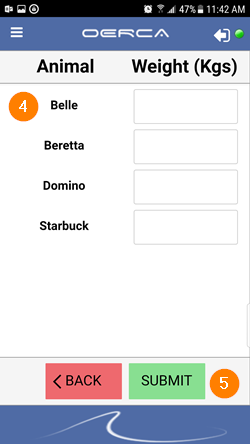
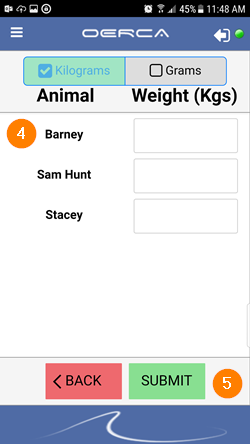
Enter the animal's weight in the corresponding field next to its name. You can record a single animal or multiple animal weights at one time. Depending on the facility type, you may also have to select the unit of weight (i.e. - kilogram vs gram).
-
Press the Submit button when complete.
mobile app application
Comments
0 comments
Please sign in to leave a comment.